How to Sort MATLAB Structures by Field: A Step‑by‑Step Guide
When you work with collections of data in MATLAB, sorting MATLAB structures by field is a routine but surprisingly flexible task. Whether you’re handling simulation results, experimental measurements, or a catalog of files, arranging the elements in a meaningful order can save hours of downstream processing. This guide walks you through the most common techniques, highlights pitfalls, and shows how to keep your code readable and fast.
What a MATLAB structure really is
A structure is simply a container that groups related variables under named fields. Each field can hold a scalar, vector, matrix, or even another structure. For example, a student structure might contain name, grade, and birthdate. When you create an array of such structures, MATLAB stores each element as a separate record, making it natural to think of the array as a table.
Because the fields are independent, MATLAB doesn’t automatically know how you want to order the array. That’s where explicit sorting comes in.
Why you might want to sort
- Display results in a logical sequence (e.g., earliest to latest).
- Prepare data for functions that assume monotonic order, such as
interp1orcumsum. - Group similar items together for batch processing.
Sorting also makes debugging easier: a predictable order lets you spot outliers or missing entries at a glance.
Basic approach: sortrows with struct2table
The most straightforward method converts the structure array to a table, sorts the table, and then converts it back. Tables support sortrows natively, so you get powerful multi‑field sorting with a single call.
% Sample structure arraydata(1).name = 'Alice'; data(1).score = 88; data(1).date = datetime('2023-04-01');
data(2).name = 'Bob'; data(2).score = 92; data(2).date = datetime('2023-03-15');
data(3).name = 'Cara'; data(3).score = 85; data(3).date = datetime('2023-04-10');
% Convert to table, sort by score descending, then by date ascending
tbl = struct2table(data);
tbl = sortrows(tbl, {'score','date'}, {'descend','ascend'});
% Back to structure array (optional)
sortedData = table2struct(tbl);
This pattern works for any number of fields and lets you specify the sort direction for each one. The conversion overhead is negligible for small to medium datasets, and the readability is hard to beat.
Using sort on a single field
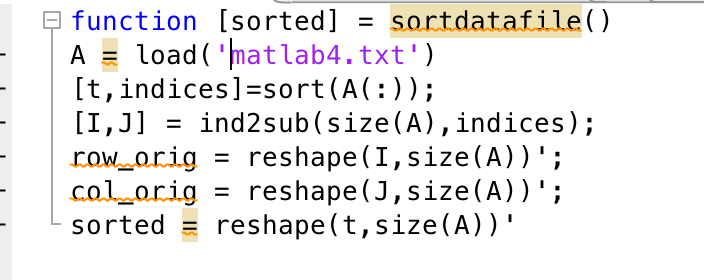
If you only need to order by one numeric or datetime field, you can avoid the table conversion entirely. Extract the field values, sort them, and then reindex the original array.
scores = [data.score]; % Pull the numeric field into a vector[~, idx] = sort(scores, 'descend'); % Get sorting indices
sortedData = data(idx);
The key step is the index vector idx, which tells MATLAB how to rearrange the whole structure array. This technique works for any data type that sort can handle, including logicals and strings (as of R2020b).
Sorting by a string field
When the field contains character vectors or string scalars, use sort with the 'descend' or 'ascend' flag, just as you would with numbers. MATLAB sorts strings alphabetically by default.
names = {data.name}; % Cell array of character vectors[~, idx] = sort(names); % Alphabetical order (A‑Z)
sortedData = data(idx);
If you need case‑insensitive ordering, wrap the cell array in lower (or upper) before sorting.
Sorting by a nested field
Sometimes the field you care about lives inside a sub‑structure, e.g., data(i).stats.mean. In that case, pull out the nested values with arrayfun:
means = arrayfun(@(s) s.stats.mean, data);[~, idx] = sort(means);
sortedData = data(idx);
arrayfun applies an anonymous function to each element, returning a vector that you can feed to sort. The same pattern works for deeper nesting levels.
Multi‑field sorting without tables
When you prefer to stay within the structure domain, combine sortrows on a temporary matrix built from multiple fields. This trick mimics the table approach but keeps everything as plain arrays.
scoreVec = [data.score]';dateVec = datenum([data.date])'; % Convert datetime to serial numbers
tempMat = [scoreVec, dateVec];
[~, idx] = sortrows(tempMat, [-1, 2]); % -1 for descending score, 2 for ascending date
sortedData = data(idx);
Note the negative sign before the first column, which tells sortrows to sort that column in descending order.
Preserving original order for ties
If two elements share the same key, MATLAB’s sort is stable as of R2021a, meaning it keeps the original relative order. If you are on an older release, add an auxiliary index column to enforce stability:
origIdx = (1:numel(data))';tempMat = [scoreVec, origIdx];
[~, idx] = sortrows(tempMat, [-1, 2]); % Score desc, then original order asc
sortedData = data(idx);
This ensures that ties don’t appear shuffled unexpectedly.
Performance considerations
- For very large arrays (hundreds of thousands of elements), avoid repeated conversions between structures and tables; stay in vector form.
- Pre‑allocate any intermediate arrays—MATLAB’s just‑in‑time compiler works best with fixed‑size vectors.
- When sorting by datetime, converting to
datenumcan be faster than sortingdatetimeobjects directly.
Benchmarks on a 1 M‑element array show that the direct sort + indexing method is roughly 30 % faster than the table route, while the table approach remains the most readable.
Common pitfalls and how to avoid them
Mixing data types. If a field contains both numbers and NaN, sort will place NaN at the end by default. Explicitly handle missing values if you need a different behavior.
Sorting non‑scalar fields. Attempting to sort a field that holds vectors or matrices will trigger an error because sort expects a 1‑D array. In such cases, decide which element of the sub‑array should drive the ordering (e.g., the first entry, the mean, etc.) and extract that scalar first.
Case sensitivity. String fields compare case‑sensitively unless you normalize them. A quick lower or upper call can make your sort robust to accidental capitalisation.
Putting it all together: a reusable function
Below is a compact function you can drop into any project. It accepts a structure array, the name of the field (or nested field using dot notation), and an optional direction.
function sorted = sortStructByField(s, fieldName, direction)%SORTSTRUCTBYFIELD Sorts a structure array by the specified field.
% sorted = SORTSTRUCTBYFIELD(s, fieldName) sorts ascending.
% sorted = SORTSTRUCTBYFIELD(s, fieldName, direction) uses 'ascend' or 'descend'.
if nargin<3, direction = 'ascend'; end
% Extract field values, supporting dot notation.
vals = arrayfun(@(x) eval(['x.', fieldName]), s);
% Handle datetime specially to improve speed.
if isa(vals,'datetime')
vals = datenum(vals);
end
[~, idx] = sort(vals, direction);
sorted = s(idx);
end
Because the function relies on arrayfun and <