How OWASP Dependency Check Becomes Your Security Sidekick
When you ship code that pulls in third‑party libraries, you’re also inheriting whatever vulnerabilities those libraries carry. OWASP Dependency Check is a free, open‑source scanner that automatically hunts for known security flaws in your project's dependencies, acting like a trusty sidekick that watches your back while you focus on building features.
What Is OWASP Dependency Check?
At its core, Dependency Check is a command‑line tool that inspects your build files—think pom.xml, package‑lock.json, or Gemfile.lock—and cross‑references each listed component against the National Vulnerability Database (NVD) and other advisory feeds. The result is a report that flags any CVE (Common Vulnerabilities and Exposures) entries tied to the exact version you’re using.
Because it works with dozens of package managers, from Maven and npm to NuGet and PyPI, you can adopt it regardless of the language stack your team favors.
Why It’s a Handy Security Sidekick
- Proactive detection: Finds known issues before they hit production.
- Low overhead: Runs quickly on a developer’s machine or as part of a CI build.
- Actionable output: Provides severity ratings, links to advisories, and even suggests safer versions.
Think of it as the early warning system you’d install on a ship. It doesn’t replace a full security audit, but it catches the low‑hanging fruit that often slips through code reviews.
Getting Started: Installing and Running the Tool
Installation is intentionally straightforward. You can pull a pre‑built binary, use Docker, or add it as a Maven/Gradle plugin. Here’s a quick start using the standalone JAR:
- Download the latest
dependency-check‑clizip from the OWASP releases page. - Unzip and add the
bindirectory to yourPATH(or call it directly). - Run
dependency-check --project MyApp --scan .from your project root.
The scanner will crawl your source tree, generate an HTML report, and exit with a non‑zero status if any findings exceed a configurable threshold. That exit code is perfect for halting builds that introduce high‑severity risks.
Integrating Dependency Check into CI/CD Pipelines
Embedding the scanner into automated pipelines turns the sidekick from a “nice‑to‑have” into a mandatory gatekeeper. Below are typical configurations for three popular CI systems.
Jenkins
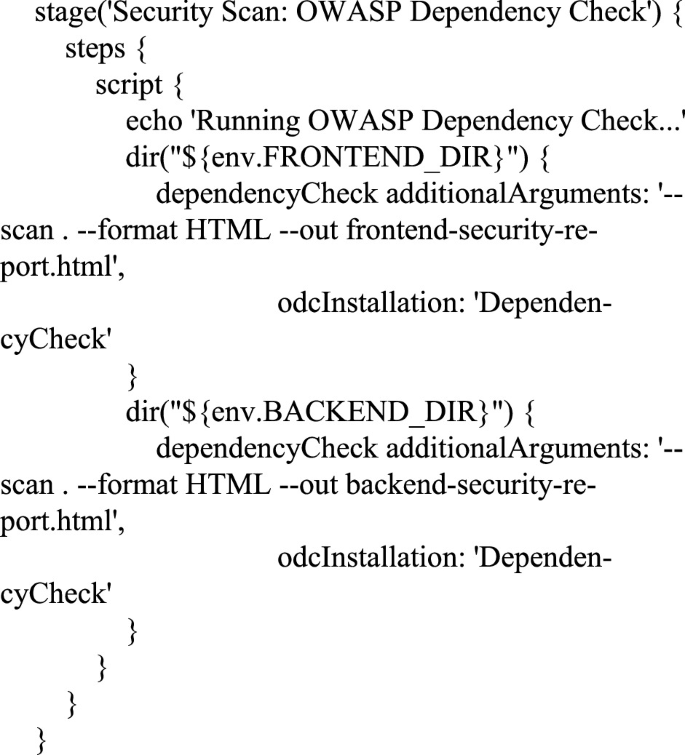
Add a build step that runs the CLI, then archive the generated dependency-check-report.html. You can also use the publishHTML plugin to surface the report directly in the Jenkins UI.
GitHub Actions
Use the official owasp-dependency-check-action from the Marketplace. A minimal workflow looks like this:
steps:- uses: actions/checkout@v3
- name: Run Dependency Check
uses: owasp/dependency-check-action@v2
with:
project: ${{ github.repository }}
path: .
GitLab CI
Define a job that pulls the Docker image owasp/dependency-check, runs the scan, and publishes the artifact:
dependency_check:image: owasp/dependency-check
script:
- dependency-check.sh --project $CI_PROJECT_NAME --scan .
artifacts:
paths:
- dependency-check-report.html
These snippets keep the scanning step lightweight and ensure any new vulnerability is caught before a merge lands on the main branch.
Interpreting Results and Reducing Noise
Not every CVE flagged is a show‑stopper. Many libraries have low‑severity issues that might not affect your use case, or the vulnerability may have been mitigated by a later patch that the scanner hasn’t indexed yet. To avoid alert fatigue, consider the following tactics:
- Set a severity floor: Configure the tool to ignore low severity findings unless they affect a critical component.
- Suppress known false positives: Use the
suppression.xmlfile to whitelist specific CVEs for particular versions. - Leverage version ranges: When a newer, safe version exists, update your lockfiles and let Dependency Check verify the upgrade.
By tailoring thresholds, you keep the report focused on what truly matters to your risk profile.
Common Pitfalls and How to Avoid Them
Even seasoned developers stumble over a few recurring issues.
Out‑of‑date CVE feed—If you run the scanner without refreshing the NVD data, you’ll miss recent disclosures. Schedule a daily --updateonly run or let the Docker image pull the latest feed each time.
Missing transitive dependencies—Some build tools don’t expose indirect dependencies by default. Ensure you enable the appropriate flag (e.g., --enableExperimental for certain npm projects) so the scanner sees the full dependency graph.
Performance hiccups on large monorepos—Scanning thousands of files can be slow. Split the scan by module or use the --scan parameter to point at specific subdirectories.
FAQ
What types of projects can Dependency Check analyze?
It supports Java (Maven, Gradle), .NET (NuGet), JavaScript (npm, Yarn), Python (pip), Ruby (Bundler), and many more. If your package manager isn’t listed, the generic “archive” mode can still scan JAR, WAR, or ZIP files for embedded libraries.
Can Dependency Check be used on a running application?
No. It works on the static artifact level—your source, lockfiles, or compiled packages. For runtime analysis you’d need complementary tools like runtime application self‑protection (RASP) or container scanning solutions.
How do I handle a vulnerability that has no patched version yet?
First, assess the exploitability in your context. If the risk is high, consider mitigation strategies such as network segmentation, input sanitization, or temporary disabling of the vulnerable feature until a fix is released.
Is there a cost to using OWASP Dependency Check?
The tool itself is free and open source. However, you may incur indirect costs for storage of reports or for the compute time needed in large CI pipelines, which are typically modest compared to the potential expense of a breach.